Merge PDF
Combine multiple PDF files into one clean, single document.
Click to upload or drag & drop
Select multiple PDF files (PDF only) — add as many as you need
Works fully on-device — there’s no fixed file size limit. Very large PDFs may just take a little longer depending on your device.
✅
Your merged PDF is ready
🔒 Everything runs locally in your browser — your files are never sent to any server to be merged.
Combine PDF Files into One Document – Fast and Simple Merge PDF Tool
Merge PDF and working with multiple PDF files can quickly become difficult, especially when all the documents belong to the same project. Instead of opening several files one by one or sending them separately, you can merge them into a single PDF. This keeps your files organized, saves time, and makes sharing much easier.
Whether you are a student submitting assignments, a professional preparing reports, or someone managing personal documents, combining PDF files into one file helps you stay organized and makes your work look more professional. A merged PDF is easier to store, print, upload, and share because everything is available in one place.
What Does Merge PDF Mean?
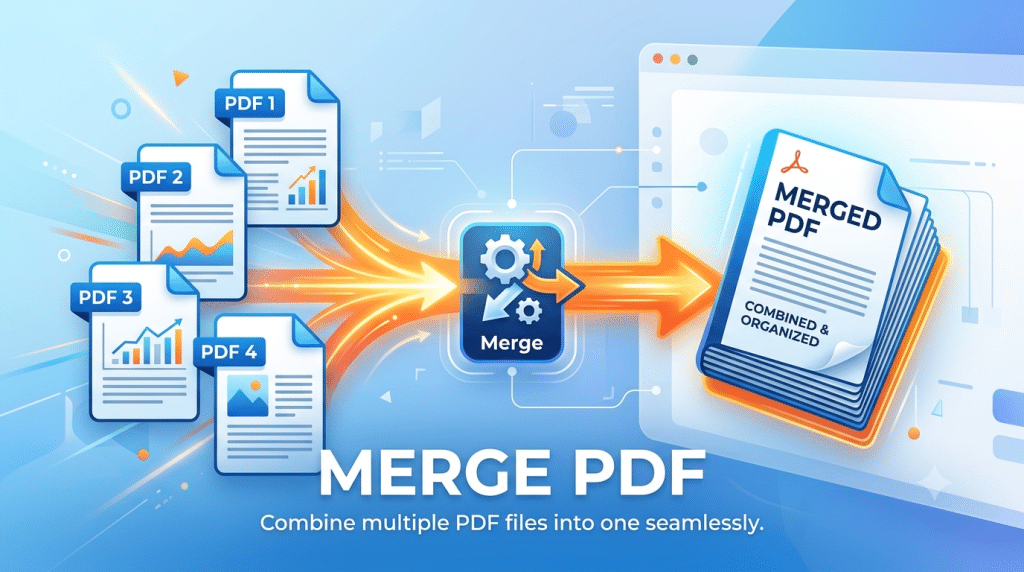
Merging PDFs simply means joining two or more PDF documents into a single file. Each page from the selected PDFs is combined in the order you choose, creating a single PDF that contains all the information.
For example, imagine you have one PDF containing a cover letter, another with your resume, and a third with your certificates. Instead of sending three separate files, you can combine PDF files into one PDF. This makes it easier for the person receiving the documents because everything is available in a single file. The process is simple and only takes a few moments, but it can save a lot of time when working with many documents.
Why Should You Merge PDF Files?
Keeping related documents together makes your work easier to manage. Instead of searching through different folders or opening several files, you only need to access one PDF file.
Merging PDF files also creates a cleaner and more organized document. This is especially useful when submitting school work, applying for jobs, sharing business reports, or storing important records. Using one document instead of many also reduces the chances of forgetting an important file while sending emails or uploading documents online.
Main Benefits of Merging PDF Files
Better Organization
When several documents are combined into one PDF, everything stays together. You no longer need to search through different files to find the information you need. This keeps your digital documents neat and easy to manage.
Faster File Sharing
Sending one PDF document is much easier than attaching several separate files. The person receiving your document only needs to download one file, making the process faster and more convenient for both sides.
Easier Printing
If your document contains many sections, printing multiple PDFs one by one can take extra time. A merged PDF allows you to print the entire document with a single click.
Simple Document Management
Having one file instead of many makes it easier to save, rename, upload, or move documents between folders and devices. Good document management also helps you stay organized over time.
Professional Appearance
A single organized PDF creates a better impression than sending several individual files. It looks cleaner and shows that your documents have been prepared carefully.
Who Uses Merge PDF Tools?
Almost everyone who works with digital documents can benefit from using a PDF merger.
Students
Students often receive assignments that include reports, diagrams, certificates, or research pages. Combining PDF files into one document makes submission easier and keeps all pages together.
Office Employees
Business teams regularly merge PDF documents such as invoices, presentations, reports, contracts, and meeting notes before sharing them with clients or managers.
Freelancers
Freelancers usually send proposals, portfolios, project samples, and invoices to clients. A merged PDF creates a professional presentation and keeps everything organized.
Business Owners
Companies store agreements, financial records, employee documents, and customer files as PDFs. Merge PDF tools help organize company records and reduce confusion.
Personal Users
Many people combine bank statements, utility bills, travel documents, receipts, or personal records into one PDF for easy storage and future reference.
Common Situations Where You Need to Merge PDFs
There are many everyday situations where combining PDF files becomes useful.
- Sending a complete job application.
- Combining scanned pages into one document.
- Joining monthly invoices together.
- Preparing business reports.
- Creating study notes.
- Organizing tax documents.
- Sharing legal paperwork.
- Combining travel documents.
- Creating digital records.
- Preparing project documentation.
No matter the purpose, Merge PDF helps keep everything together in one place.
How to Merge PDF Files
Most PDF merger tools follow the same simple process.
First, upload the PDF files that you want to combine. Next, arrange them in the order you prefer because the final document will follow that sequence. After checking the order, click the merge button and wait a few seconds while the tool combines the files. Once the process is complete, download the merged PDF and review it to make sure every page appears correctly. The entire process usually takes less than a minute.
Tips for Getting the Best Results
Before merging PDF files, spend a few moments checking the documents. Make sure each PDF contains the correct pages and remove anything that is no longer needed. Arrange the documents carefully because changing the page order later may require editing the PDF again.
After you download the merged PDF, open it and scroll through every page. This simple check helps ensure that no pages are missing, duplicated, or placed in the wrong order. Using clear file names before uploading also makes the process faster and reduces mistakes.
Is It Safe to Merge PDF Online?
Most trusted online PDF tools use secure connections to protect your files while they are being processed. Many services also delete uploaded documents after a short period to protect your privacy.
If your PDFs contain personal, financial, legal, or business information, always choose a secure PDF merger that values user privacy and keeps your documents safe.
Mistakes to Avoid When Merging PDFs
Many users accidentally create problems that can easily be avoided. Uploading files in the wrong order is one of the most common mistakes. Another common issue is forgetting to review the final document after merging PDF files.
Some people also include duplicate files or unnecessary pages, making the final PDF larger than needed. Taking a few extra moments to review everything before and after merging helps create a clean and professional document.
Why Use an Online Merge PDF Tool?
An online PDF merger is popular because it is quick, simple, and does not require complicated software. Most tools work directly in your web browser, allowing you to merge PDF files online from a computer, tablet, or smartphone without installing anything.
This makes online tools a convenient choice for users who need to combine documents from different devices while working at home, in the office, or on the move.
Frequently Asked Questions
Can I merge more than two PDF files?
Yes. Most PDF merger tools allow you to combine several PDF documents into one file at the same time.
Will the quality of my PDF change?
A good PDF merger keeps the original quality of your documents, including text, images, and formatting.
Can I change the order of pages?
Yes. Most Merge PDF tools let you drag and rearrange files or pages before creating the final PDF.
Can I merge PDFs on my phone?
Yes. Many online PDF tools work smoothly on Android phones, iPhones, tablets, laptops, and desktop computers.
Is there a file limit?
The file size depends on the Merge PDF tool you are using. Some allow large files, while others have upload limits.
Final Thoughts
Merging PDF files is one of the easiest ways to organize digital documents and improve the way you share information. Instead of dealing with multiple files, you can combine PDF files into one well-structured PDF that is easier to manage, upload, print, and store.
Whether you are preparing school work, business reports, job applications, contracts, or personal records, a Merge PDF tool helps you save time and keeps your documents neat and professional. Choosing the right PDF merger allows you to combine files quickly while maintaining quality, making document management simpler for everyone.